Leave Your Message

Name*

Phone number*

Email Address*

Country*

Message*

Annual Quantity*

Application*

What Is a Circular LCD Display?

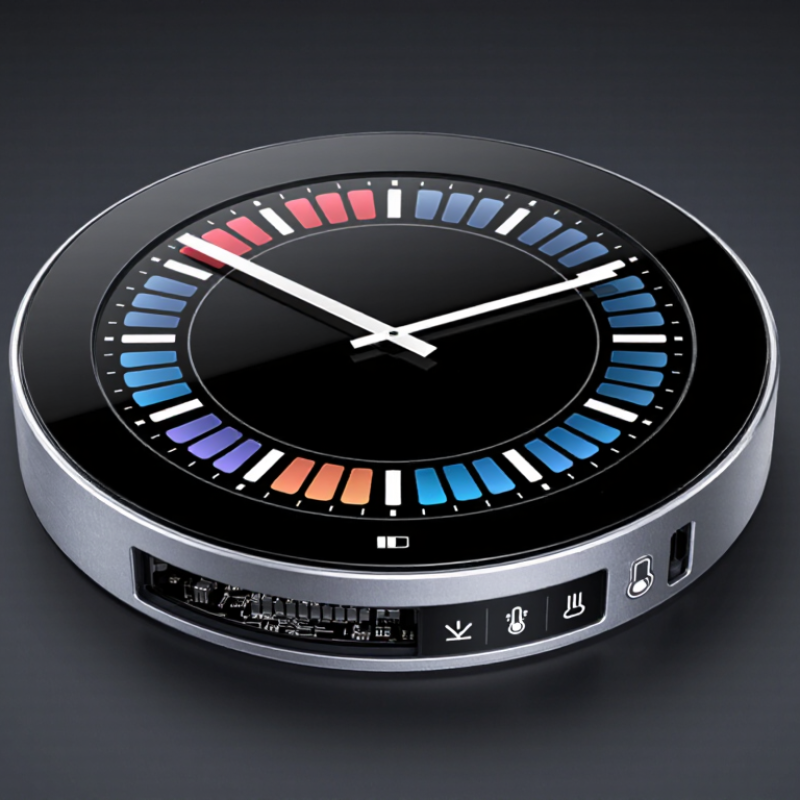
A Circular LCD Display is a liquid-crystal screen built with a round or ring-shaped viewing area. Its outline may look simple, but the design involves careful choices. Engineers must fit pixels, backlighting, and control circuits into a non-rectangular panel. On a smartwatch, the result may show a crisp dial against a dark bezel. On a machine, it can present a temperature reading or a status icon at a glance. The shape is distinctive. Readability still matters more.

The term can describe different products, so it is worth checking the panel’s active display area, resolution, brightness, viewing angle, and interface before choosing one. Some round displays use a circular active area; others mask a rectangular panel behind a round window. That difference affects usable pixels and the appearance of text near the edges. Small details matter. For a trustworthy expert quotation, a source is needed. Display engineer Dr. Larry Weber is a recognized figure in display technology, but no verified statement from him about circular LCDs is provided here. Rather than inventing one, this introduction uses a clearly marked paraphrase of a general engineering principle: “A display’s shape should support clear information, not compromise it.” This is not a verbatim quote. As you explore what a Circular LCD Display is, consider how its geometry, optical performance, and intended use work together—and where the round form may impose practical limits.
What Is a Circular LCD Display?

Defining a Circular LCD Display

What Is a Circular LCD Display?

Defining a Circular LCD Display

A circular LCD display is a liquid-crystal screen with a round visible image area. Its pixels still form rows and columns; the circular edge comes from the panel design, a shaped mask, or both. This distinction matters. A round bezel does not automatically make the active display circular. In some designs, unused pixels sit behind a dark border, while custom-shaped panels bring the viewing area closer to the edge. The result can look seamless, but the boundary needs careful alignment.

The screen relies on familiar LCD layers: liquid crystals control transmitted light, and a backlight illuminates the image. Polarizers, color filters, and driving electronics remain essential. Small details matter. A poorly matched mask may clip icons, while uneven backlighting can make the edge look dim.

Circular LCDs suit instrument panels, smart appliances, and compact control interfaces, where round layouts work well for gauges or status indicators. Yet circles leave less room for text than rectangles do. That trade-off is easy to overlook. Even a bright, sharp screen may feel cramped if labels sit too close to its curved edge.

Choosing one means checking active-area dimensions, resolution, viewing angle, and brightness under real lighting—not just judging the shape on a drawing.


Key Components and Display Structure

A circular LCD display uses liquid crystals to control light across a round viewing area. Its structure is a layered stack, not a single circular part. At the rear, a backlight shines through a reflector and diffuser, helping spread illumination evenly. Polarizing films and the liquid-crystal cell then regulate how much light reaches each pixel. Color filters create the visible red, green, and blue elements. Tiny electrodes and, in many designs, thin-film transistors control individual pixels.

The round outline can come from the active panel itself or from a circular mask over a rectangular pixel matrix. That difference affects usable screen space. Not every corner is useful. A bezel supports the panel, while a cover lens protects its front surface; a flexible circuit connects the display to its controller. The driver sets pixel timing and voltage, so clean connections matter as much as the visible layers. One detail is easy to underestimate: light can look less uniform near the curved edge. Testing the display at its actual size often reveals this sooner than a drawing does. The stack is compact, but fitting each layer precisely takes care.

A circular LCD uses the same basic optical stack as other LCDs; its display cell and bezel are shaped to fit a circular design. The chart shows the layer order from the viewer toward the rear. Bar lengths indicate sequence only, not physical thickness.

How Circular LCDs Produce Images

A circular LCD forms images through a layered light-control system. A backlight sends white light through a rear polarizer, then liquid-crystal cells twist or block it. Tiny electrodes control each cell’s alignment. The front polarizer converts that change into bright or dark pixels, while red, green, and blue filters create color. The light is shaped, not emitted. In a typical 8-bit-per-channel image, 256 levels across three color channels allow about 16.7 million color combinations.

The pixels usually sit in a rectangular grid, even when the visible screen is round. A circular mask hides the corners, and the display controller maps image content to the remaining pixels. Rows near the center can span more pixels than rows near the rim, so fine curves may look slightly stair-stepped. That detail is easy to miss. At 60 Hz, each frame lasts about 16.7 milliseconds, leaving the liquid crystals time to update the image. The Society for Information Display’s International Committee for Display Metrology publishes the Information Display Measurements Standard, which sets methods for assessing luminance, contrast, and uniformity. Those measurements matter: uneven backlighting can make a white circle look faintly gray at its edge. In practice, the mask and pixel map need careful tuning; the circle is not automatically perfect.

Common Types and Applications

A circular LCD has a round active viewing area, rather than a rectangular image hidden behind a round bezel. Common types include monochrome segment displays, which show fixed symbols, and color TFT LCDs, which render changing graphics. Transflective versions combine reflected and transmitted light, helping preserve readability in bright outdoor conditions. The right choice depends on viewing angle, brightness, power use, and how much detail the interface needs.

Simple segment LCDs suit timers, appliance controls, meters, and thermostats. Round TFT displays can show maps, icons, and changing measurements, making them useful in wearables, vehicle instrument clusters, and compact medical or industrial equipment. Touch capability is another option, though adding a touch layer can increase cost and affect visibility. The trade-off is real.

The wider market context is growing, but it does not measure circular LCD demand directly. The International Energy Agency’s Global EV Outlook 2024 reports nearly 14 million electric car sales in 2023, about 18% of global car sales, supporting demand for richer in-car interfaces. OICA recorded roughly 93.5 million motor vehicles produced worldwide in 2023. These figures describe potential application environments, not round-screen sales. In practice, a circular layout can feel intuitive for a dial, yet awkward when users must read long labels.

What Is a Circular LCD Display? - Common Types and Applications
Common Type How It Works Typical Characteristics Common Applications Design Considerations
Segment Circular LCD Uses shaped electrodes to form predefined symbols, bars, icons, or numerals rather than a full pixel grid. Displays fixed information with a simple, low-complexity layout. Available in monochrome versions and can be designed for a specific viewing area. Appliance control panels, meters, thermostats, timers, and instrument indicators. Best when the required graphics are known in advance. Custom electrode patterns limit the ability to display new graphics later.
Monochrome Graphic Circular LCD Arranges individually controlled pixels in a matrix, allowing text, icons, and simple graphics to be drawn within a circular viewing area. Often uses monochrome LCD modes such as STN or FSTN. Offers more layout flexibility than a segment display while typically showing fewer colors than a color TFT. Handheld instruments, control interfaces, measuring devices, and compact equipment displays. Check pixel resolution, viewing angle, contrast, and whether the display is reflective, transflective, or backlit for the intended lighting conditions.
Circular TFT LCD Uses an active-matrix thin-film-transistor backplane to control pixels, commonly producing color images and detailed graphics. Can show multiple colors, smooth graphics, and changing content. Usually requires a backlight and more display-control electronics than a basic segment LCD. Smartwatch faces, camera or device viewfinders, control panels, and consumer or industrial interfaces. Evaluate resolution, brightness, viewing angle, power use, interface requirements, and the shape of the active display area.
Transflective Circular LCD Combines transmissive and reflective behavior so ambient light can help illuminate the image while a backlight supports dimmer environments. Can remain readable across a wider range of lighting conditions than a display relying only on a backlight, though performance depends on the panel design and ambient light. Outdoor instruments, sports or fitness devices, portable meters, and equipment used in changing light. Consider expected sunlight exposure, indoor use, backlight settings, contrast, and the viewing angle required by the user.

Advantages and Design Considerations

What Is a Circular LCD Display?

Advantages and Design Considerations

A circular LCD display has a round active viewing area rather than the familiar rectangular shape. It suits products whose physical form is already circular, such as watch faces, instrument gauges, and appliance controls. The shape can make key readings feel centered and easy to scan. A curved progress indicator, for example, can follow the edge of the screen instead of occupying a separate graphic panel. That matters. But a round screen does not automatically make an interface clearer; poorly placed text can feel cramped near the edges.

Design starts with the usable display area, not just the outside diameter. Corners are absent, so menus and labels need careful positioning. Keep essential numbers near the center, and test small text at the actual viewing distance. Pixel layout, contrast, backlight brightness, and viewing angle also affect readability. A bright workshop and a dim bedroom create different demands. Touch designs need another check: users may reach for controls close to the curved border, where space is limited. The display driver, enclosure, and any cover lens must fit the chosen panel. These details are easy to underestimate, and the right balance often requires testing with real users.