How to Choose the Right Display LCD Screen for Your Needs?
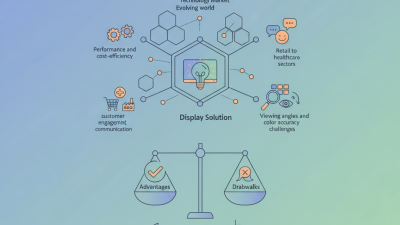
Choosing the right Display LCD Screen is vital for various applications. Expert John Smith, a leading authority in display technologies, states, "A well-selected screen can enhance user experience significantly."
When selecting a Display LCD Screen, you must consider multiple factors. Resolution, size, and panel type all play crucial roles. A high resolution may be necessary for detailed visuals, while size should match the intended use. Take gaming, for example; a larger screen can provide an immersive experience but may not fit all spaces.
Yet, this process is often filled with challenges. Many overlook compatibility with existing devices. Others may not prioritize viewing angles, which can affect usability in shared environments. Balancing budget constraints with desired features is another ongoing struggle. Reflecting on these elements can lead to a more informed decision.
Understanding Different Types of LCD Displays and Their Applications
When selecting an LCD display, understanding the various types is essential. There are several common categories: TN (Twisted Nematic), IPS (In-Plane Switching), and VA (Vertical Alignment) panels. Each type has its strengths and weaknesses based on specific needs. For instance, TN panels are known for their fast response times, making them ideal for gaming. However, they might lack color accuracy and viewing angles.
IPS displays offer superior color reproduction and wider viewing angles, which are great for professional design work. Yet, they might come at a higher price point. VA panels provide excellent contrast ratios and deep blacks, but they can suffer from slower response times, resulting in motion blur during fast-moving content. Knowing the differences among them can significantly impact your choice, depending on your intended application.
Before making a decision, consider your primary use case. Do you prioritize color accuracy for graphic design or speed for gaming? Evaluate your budget, as some options may not fit all financial constraints. Reflecting on these aspects can lead to more informed and responsible choices. Remember that the perfect display may not exist, and compromises might be necessary based on your needs and preferences.
Evaluating Screen Size and Resolution for Optimal Viewing Experience
When selecting an LCD screen, evaluating screen size and resolution is key to achieving an optimal viewing experience. Studies show that a larger screen size can enhance immersion, particularly for tasks like gaming or watching videos. According to a report from the Display Industry Association, a screen size of 27 inches is ideal for desktop use, striking a balance between space and clarity.
Resolution plays a critical role in how detailed the visuals appear. The common benchmarks include Full HD (1920x1080), 4K (3840x2160), and even 8K resolution (7680x4320). Research indicates that users often notice a significant difference in clarity between Full HD and 4K displays, especially on larger screens. For instance, a 4K display offers four times the pixel density of Full HD, enhancing fine detail in images.
Tip: Consider the distance between your eyes and the screen. A general rule is that the viewing distance should be about 1.5 to 2.5 times the diagonal size of the screen for optimal clarity.
While high resolution and larger sizes are beneficial, they may not be necessary for everyone. Some may feel overwhelmed or find that their current hardware struggles to support higher resolutions, impacting performance. It's essential to balance these factors based on your specific use case.
Tip: Always check your graphics capabilities before upgrading to ensure your devices can handle the display’s requirements.
Assessing Brightness, Contrast Ratio, and Color Accuracy Requirements
When selecting an LCD screen, brightness is a crucial factor. Brightness, measured in nits, affects visibility. A screen with adequate brightness allows for better performance in various lighting conditions. For instance, a screen with 300 nits might struggle outdoors in direct sunlight, while 500 nits can provide clarity. If your work requires outdoor use, prioritize higher brightness levels.
The contrast ratio is another significant aspect to consider. It indicates the difference between the brightest and darkest parts of a screen. A higher contrast ratio results in more vivid images. A 1000:1 ratio enhances the depth of blacks, making images pop. However, not all applications need extreme contrast. Understanding your specific viewing environment is essential.
Color accuracy is vital for tasks like graphic design and photography. An accurate display reproduces colors true to life. Look for screens with a high color gamut, ideally covering sRGB or Adobe RGB standards. This ensures the displayed colors reflect the original intent. However, too much emphasis on color accuracy can lead to oversaturation in casual viewing. Reflecting on your actual needs is vital for making the right choice.
Considering Connectivity Options and Compatibility with Your Devices
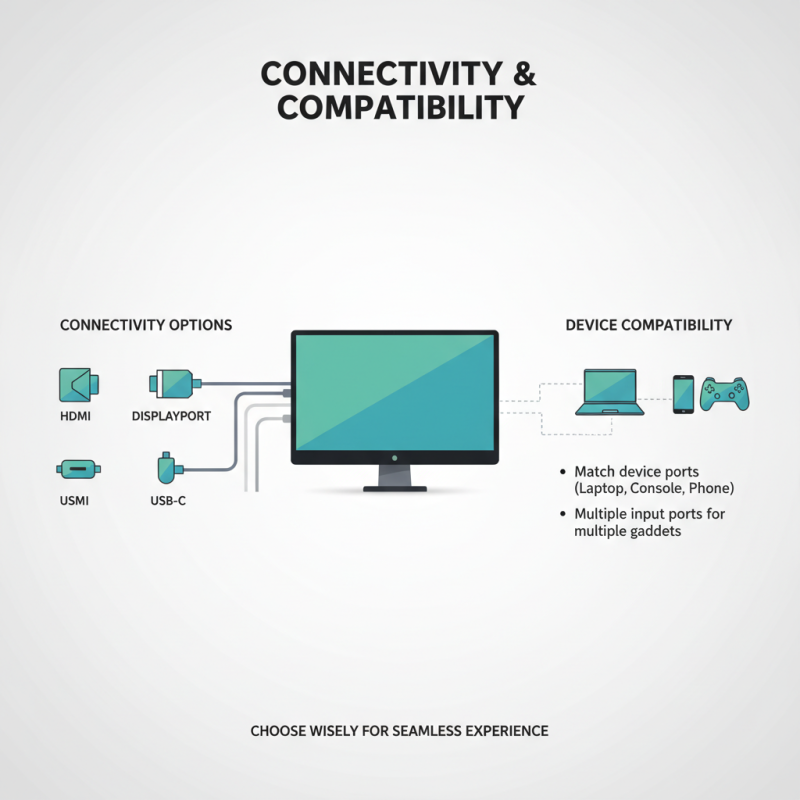
Choosing the right display LCD screen involves more than just size and resolution. One crucial aspect is connectivity. Different devices require specific connections like HDMI, DisplayPort, or USB-C. Understanding these options ensures compatibility with your existing gadgets. If you frequently connect multiple devices, consider a screen with multiple input ports.
Compatibility is essential for a seamless experience. Research the specifications of your devices before making a purchase. Some screens may not support certain features, such as 4K resolution or high refresh rates. A mismatch can lead to frustration and underperformance.
Tips: Always check the supported resolutions. Some screens may seem enticing but may not meet your needs. Remember to look at both physical and wireless connections. Many modern screens offer wireless display features, but not all devices support this. Check compatibility to avoid disappointment.
Budgeting for Your LCD Screen: Factors to Keep in Mind
When budgeting for an LCD screen, consider several key factors that directly affect your overall expenditure. Display size, resolution, and panel technology play significant roles in determining price. According to recent industry reports, larger screens can cost up to 20% more than smaller options. Higher resolutions, such as 4K, typically add another 15-30% to the price.
Tips for budgeting: Determine your primary use. If you're gaming or editing videos, prioritize resolution and refresh rate. If it's for basic tasks, a lower resolution might suffice. Research panel technologies. IPS panels offer better color accuracy but might be pricier.
Another important aspect is energy efficiency. Energy Star-certified models can save on electricity bills, providing long-term savings. A study by the Department of Energy outlines that energy-efficient screens can reduce costs by up to 30% over their lifespan. Keep in mind the hidden costs too, such as installation and additional accessories. Staying informed will allow for smarter investments. Being aware of your specific needs will guide your spending wisely.
How to Choose the Right Display LCD Screen for Your Needs? - Budgeting for Your LCD Screen: Factors to Keep in Mind
| Screen Size (inches) |
Resolution |
Aspect Ratio |
Price Range (USD) |
Best Use Case |
| 24 |
1920 x 1080 |
16:9 |
150 - 300 |
Office Productivity |
| 27 |
2560 x 1440 |
16:9 |
300 - 500 |
Graphic Design |
| 32 |
3840 x 2160 |
16:9 |
500 - 800 |
Video Editing |
| 15.6 |
1920 x 1080 |
16:9 |
100 - 200 |
Portable Use |
| 49 |
3840 x 1080 |
32:9 |
800 - 1200 |
Gaming |