How to Choose the Best Display LCD Screen for Your Needs?
Choosing the right Display LCD Screen can be challenging. With so many options available, understanding your needs is vital. Industry expert Mark Johnson states, "A great display can elevate daily experiences and productivity." This emphasizes the importance of selecting the ideal screen.
Consider the size, resolution, and intended use of the Display LCD Screen. Are you using it for gaming, professional work, or casual viewing? Each scenario requires specific features. For example, gamers might prioritize high refresh rates, while designers focus on color accuracy.
Moreover, reflect on your budget. The best screen may not always be the most expensive. Sometimes, mid-range options provide excellent quality. Research and evaluate your choices carefully. Investing time in this process will pay off in the long run, ensuring you make an informed decision and avoid buyer's remorse.
Understanding Different Types of LCD Screens: IPS, VA, and TN Panels
When selecting an LCD screen, understanding the different types is crucial. IPS (In-Plane Switching) panels offer vibrant colors and wide viewing angles. They are often preferred for graphic design and media consumption due to their superior color reproduction. If you work in these areas, an IPS panel may be worth considering.
On the other hand, VA (Vertical Alignment) panels provide deeper blacks and better contrast. They excel in darker environments, making them suitable for watching movies or gaming. However, they can have slower response times. For casual gaming, this might be an acceptable trade-off.
TN (Twisted Nematic) panels are known for their fast response times and lower cost. They are a popular choice among competitive gamers. Yet, they lack the color accuracy and viewing angles of IPS panels. If you primarily play fast-paced games, a TN panel could serve you well, but consider the limitations in other areas. Choosing the right panel type is about balancing your specific needs with these trade-offs.
Key Specifications to Consider: Resolution, Brightness, and Contrast Ratios
When selecting an LCD screen, key specifications significantly impact your experience. Resolution is one of the most critical factors. Higher resolution means sharper images. For instance, a Full HD resolution (1920x1080 pixels) provides much clearer visuals than standard HD (1280x720). However, resolution alone may not be sufficient if your screen size is too small.
Brightness is another essential specification. A brighter display ensures visibility in well-lit environments. Look for screens with higher brightness levels, especially if you plan to use them in bright rooms. Standard brightness is around 250-300 nits. However, some models offer over 500 nits. This can dramatically enhance your viewing experience.
Contrast ratios affect how vivid colors appear on the screen. A high contrast ratio means deeper blacks and more vibrant colors. For example, a ratio of 1000:1 offers compelling depth in images. But be aware, contrast can be subjective. Different lighting conditions may affect perception. Selecting the right settings is crucial for optimal performance.
Careful consideration of these aspects can lead to a more satisfying choice.
Evaluating Screen Size and Aspect Ratio Based on Usage Requirements
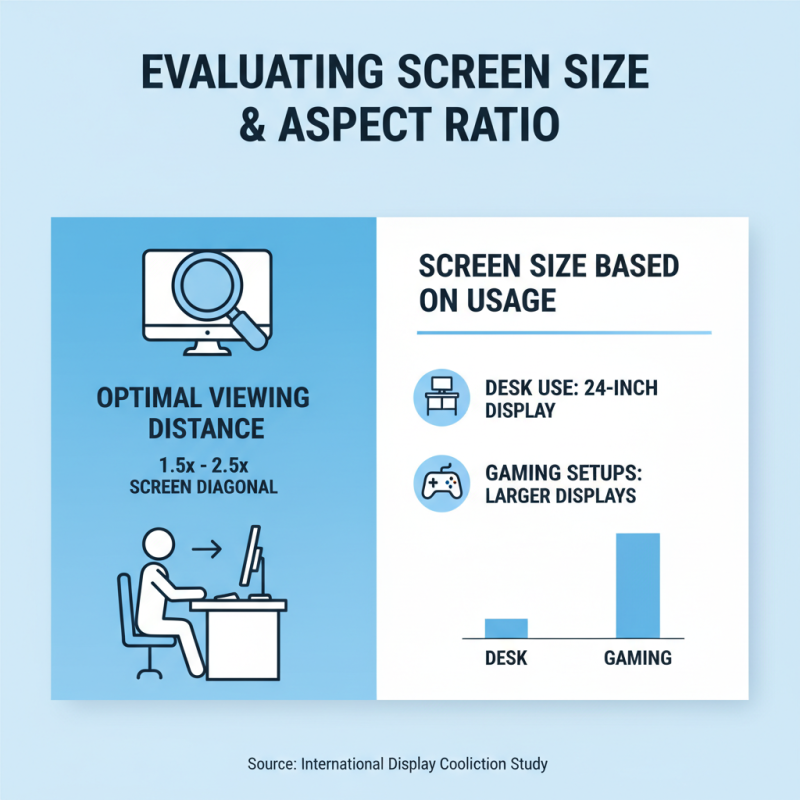
When choosing an LCD screen, evaluating screen size and aspect ratio is crucial. The right screen size often depends on usage requirements. For instance, a study by the International Display Coalition notes that users typically prefer a screen size that allows for comfortable viewing at a distance of around 1.5 to 2.5 times the diagonal size of the display. A 24-inch screen is often ideal for desk use, while larger sizes may benefit gaming setups.
Aspect ratio directly influences how content is viewed. The 16:9 aspect ratio is common for multimedia applications, while 16:10 is favored for productivity. According to the Consumer Technology Association, 29% of users prefer widescreen displays for gaming, which suggests a shift in viewing habits. Users may need to consider their primary activities with the display in mind.
Tips for selection:
- Check your workspace. Ensure there’s enough room for the screen size you choose.
- Analyze your primary tasks. Gaming, content creation, or professional work may require different setups.
- Don’t ignore personal comfort. Too large a screen can cause strain, while too small may hinder productivity.
With these considerations, choosing the right LCD screen becomes a more informed decision.
The Importance of Refresh Rate and Response Time for Gaming Screens
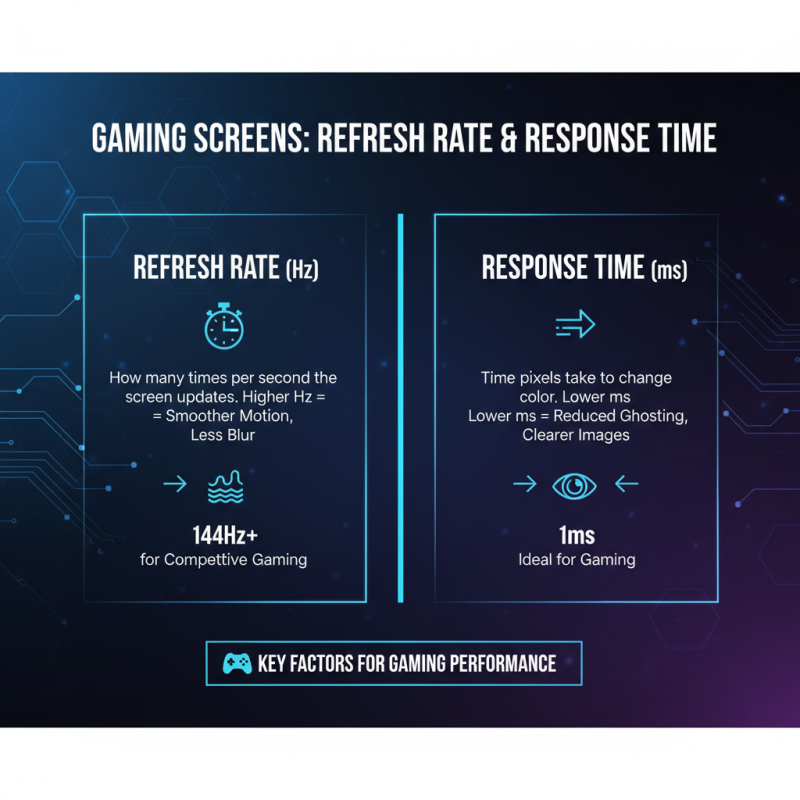
When selecting a display LCD screen for gaming, refresh rate and response time are critical factors. The refresh rate, measured in hertz (Hz), indicates how many times per second the screen updates. A higher refresh rate provides smoother motion and reduces blur. For competitive gaming, 144Hz or higher is often preferred. This allows players to react more quickly to fast-moving action on screen.
Response time is equally important. This measures how quickly a pixel can change from one color to another. Lower response times, typically 1ms to 5ms, minimize ghosting effects. This is vital in fast-paced games where clarity matters. If the response time is too high, motion can appear smeared. This can be distracting and may impact performance.
Choosing the right settings for your gaming experience involves some trial and error. You might find your ideal setup after a few adjustments. Factors like your graphics card and personal preference also play a role. Learning from these experiences can help you make better decisions in the future. Balancing refresh rate and response time will enhance your gaming experience significantly.
Assessing Connectivity Options and Compatibility with Devices
When choosing an LCD screen, consider its connectivity options. Different devices require different ports and cables. Check if you need HDMI, VGA, or USB-C connections. Many modern screens support multiple options, which increases compatibility with various devices. If you're using older devices, ensure the screen has the required inputs.
Compatibility is crucial. Make sure your operating system supports the display. Some screens work better with specific systems. Sometimes, drivers need updating for optimal performance. This can be an overlooked step that affects usability. Assess your primary use case to ensure the screen's performance meets your needs.
Tips: Always test the screen with your devices before purchasing. This step can reveal any connectivity issues. Another useful tip is to read user reviews focusing on connectivity experiences. They can highlight potential shortcomings. A little research can save you from disappointments down the line.
LCD Screen Connectivity Options
This bar chart illustrates the number of devices that support various connectivity options for LCD screens. HDMI remains the most widely supported connection type, making it a crucial choice for users looking to maximize compatibility.