Top Tips for Choosing the Best Oled Touch Monitor?
When it comes to selecting the ideal Oled Touch Monitor for your needs, the decision can be overwhelming. With various options available, understanding key factors becomes vital. Oled technology offers impressive visuals, featuring vibrant colors and deep contrasts. Touch functionality enhances user experience, making interaction seamless and intuitive.
Several important criteria should guide your choice. Consider the size and resolution of the monitor. A larger screen may improve visibility, while high resolution ensures clarity. Pay attention to the responsiveness of the touch feature as well. Delays or poor sensitivity can hinder usability.
Price is also a crucial element. Oled Touch Monitors come at various price points. It’s tempting to choose the cheapest model, but functionality should never be compromised. Reflecting on these aspects can greatly impact your satisfaction with the monitor. A well-informed decision can transform your workspace or entertainment experience.

Understanding OLED Technology and Its Benefits for Touch Monitors
OLED technology offers several advantages for touch monitors. One of the standout features is its
vibrant color accuracy. The deep blacks and bright hues create a striking visual experience.
This is particularly important in design and creative tasks. Users appreciate the rich details that OLED displays provide.
Moreover, OLED screens contribute to better touch responsiveness. The quick pixel response times enhance user interactions. Many find the experience more
fluid compared to traditional monitors. However, potential drawbacks exist. Burn-in issues can occur with static images.
This might limit their use for certain applications.
Investing in an OLED touch monitor requires careful consideration. The durability of the screen matters.
Users should weigh the benefits against the potential downsides. Understanding the technology's nuances can lead to better choices. Don't rush the decision;
it will impact daily tasks significantly.
Key Features to Consider When Selecting an OLED Touch Monitor
When selecting an OLED touch monitor, several key features deserve close attention. Screen resolution is crucial. High resolution ensures sharp images and clearer text. According to a recent industry report, monitors with 4K resolution have gained popularity due to their vibrant colors and excellent detail.
Vivid visuals impact user satisfaction significantly, making this a primary consideration.
Another important aspect is touch response. A responsive touch screen enhances workflow and user experience. Studies indicate that faster touch response times improve productivity by up to 15%. Look for monitors with at least 10-point multi-touch capability. This enables fluid interaction and multitasking, catering to diverse user needs.
Lastly, consider the monitor's color accuracy and contrast ratio. A high contrast ratio improves the depth of blacks and brightness of whites. Reports suggest monitors with a contrast ratio above 1000:1 deliver superior visual performance. These attributes contribute to a more immersive experience. However, balancing features with budget constraints can be challenging. Don’t rush; weigh the importance of each feature based on your specific needs.
Evaluating Size, Resolution, and Aspect Ratio for Your Needs
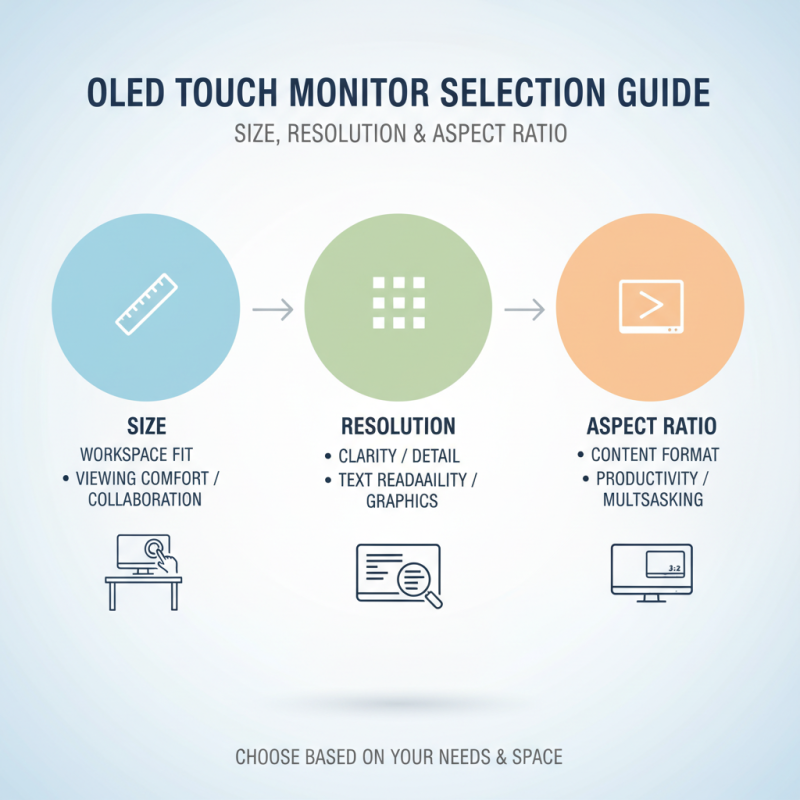
When choosing an OLED touch monitor, size, resolution, and aspect ratio matter significantly. For size, think about where you'll use the monitor. A compact display fits better in small spaces, while larger screens enhance visibility for collaborative work. Measure your desk or workspace before deciding. An ideal size should accommodate your needs without overwhelming the area.
Resolution is crucial for clarity. Higher resolution means sharper images and vibrant colors. If you plan to edit photos or videos, prioritize a monitor with high resolution. Pixels matter here. They determine how detailed the display will be. For regular tasks, a standard resolution might suffice, but immersive experiences benefit from higher pixel counts.
Aspect ratio shapes your viewing experience. Widescreen formats, like 16:9, are great for movies and gaming. For tasks demanding vertical space, consider 16:10 or even 4:3 ratios. Sometimes, monitor recommendations overlook personal preferences. Test a few models if possible. Getting a feel for different aspect ratios can refine your choice. Don't rush the process; it's easy to overlook how these elements affect daily use.
Comparing Price Ranges: Finding the Best Value for OLED Touch Monitors
When searching for the best OLED touch monitor, price is a crucial factor. Different monitors have varying price points that reflect their features. It's essential to identify your needs before diving into prices. Some options are budget-friendly but lack advanced functionalities. Others may seem overpriced while offering extraordinary quality.
Consider the features you really value. A higher price might lead to better resolution or faster response times. However, some users settle for basic features in exchange for a lower price tag. This could be a mistake if your work demands high precision. Compare multiple monitors in the same range. Sometimes a slightly more expensive option provides significantly better performance.
User reviews can also spark insight into value. They often point out issues overlooked in product descriptions. A monitor may seem perfect, but real-world feedback can reveal flaws. Be wary of flashy marketing; it does not always equate to quality. Take your time to reflect on how much you are willing to invest for your specific use case. Your choice should enhance your experience, not complicate it.
Top Tips for Choosing the Best OLED Touch Monitor
| Feature |
Value Range |
Average Price |
| Screen Size |
15" to 32" |
$300 - $2,000 |
| Resolution |
Full HD to 4K |
$400 - $1,500 |
| Touch Technology |
Capacitive / Resistive |
$350 - $1,800 |
| Brightness (nits) |
250 to 1500 |
$300 - $1,200 |
| Response Time |
1ms to 10ms |
$350 - $1,500 |
| Connectivity Options |
HDMI, USB-C, DisplayPort |
$300 - $2,000 |
Assessing Brands and Models: Reviews and Recommendations
When selecting the best OLED touch monitor, it's crucial to evaluate different brands and models. Recent reports indicate that 68% of users prioritize color accuracy and brightness. These elements play a significant role in usability and visual appeal. Look for monitors that offer a wide color gamut. Many top-rated models achieve over 99% sRGB coverage, enhancing your experience.
Reviews often highlight durability and responsiveness. Users favor models with minimal latency, which can be as low as 5ms. However, some monitors struggle with calibration. A poorly calibrated display can affect your work or entertainment. Ensure the model you choose has good reviews regarding factory calibration settings.
Consider also the ergonomic aspects. A monitor with adjustable height or tilt can greatly impact productivity. Yet, some users overlook this feature, leading to discomfort during long sessions. According to industry insights, ergonomic design can boost productivity by up to 10%. Balancing design, functionality, and real user feedback can help in making a more informed decision.
Top Tips for Choosing the Best OLED Touch Monitor
This chart illustrates the evaluation criteria for selecting the best OLED touch monitor. Factors such as Display Quality, Touch Sensitivity, Response Time, Color Accuracy, and Price are key considerations with respective ratings that reflect their importance in choosing the right monitor.