Leave Your Message

Name*

Phone number*

Email Address*

Country*

Message*

Annual Quantity*

Application*

Ultimate LCD Display Panel Tips for Enhancing Your Viewing Experience

When it comes to enhancing your viewing experience, the Display Panel LCD plays a crucial role. These screens are prevalent in homes and offices, delivering vibrant images and sharp details. However, many users overlook simple adjustments that can significantly improve picture quality.

One common issue is the factory settings that may not suit individual preferences. Screen brightness, contrast, and color settings often need fine-tuning. A well-calibrated Display Panel LCD can make colors pop and details stand out.

Another aspect to consider is the viewing environment. Ambient lighting can affect how images are perceived. Suboptimal lighting can lead to glare or washed-out colors, emphasizing the importance of strategic placement. Reflecting on these adjustments can lead to a more fulfilling visual experience.

Ultimate LCD Display Panel Tips for Enhancing Your Viewing Experience

Understanding LCD Display Panel Types and Their Impact on Viewing Quality

Ultimate LCD Display Panel Tips for Enhancing Your Viewing Experience

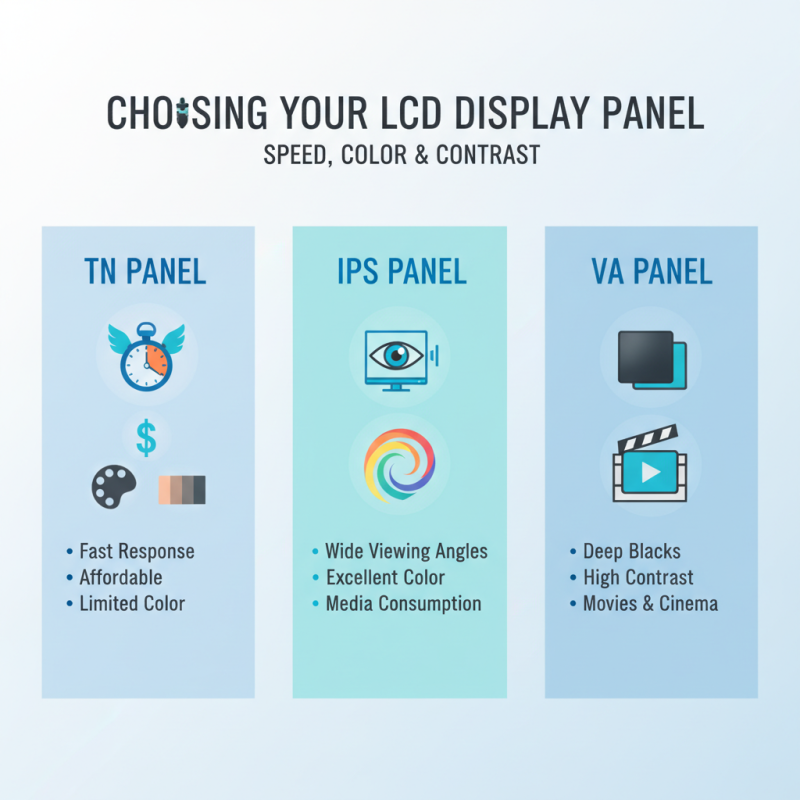
When choosing an LCD display panel, the type can greatly affect your viewing experience. There are several types, including TN, IPS, and VA panels. TN panels are often fast and affordable, but their color reproduction can be lacking. IPS panels provide better viewing angles and vibrant colors, making them ideal for media consumption. VA panels excel in contrast, offering deep blacks and are great for movies.

Here are some tips to enhance your viewing experience with LCD displays. First, consider the positioning of your screen. A slight tilt can impact color accuracy. Next, calibrate your display's settings. Adjust brightness, contrast, and color balance to reduce eye strain during long sessions. It's also worth exploring ambient light settings, as too much glare can distract you from the visuals.

Check the refresh rate as well. Higher rates provide smoother motion, which is especially noticeable in fast-paced content. However, if watching a movie, a lower refresh rate may suffice. Each panel type has its advantages and downsides. Make decisions based on your viewing habits and preferences. What might seem perfect could easily disappoint in different scenarios.

Key Factors Influencing Display Performance: Resolution, Brightness, and Contrast

When it comes to enhancing your viewing experience, the key factors of resolution, brightness, and contrast play critical roles. A recent report from the Display Measurement Standards Group highlights that higher resolution screens, such as 4K, can improve detail by up to 400% compared to standard HD. This difference is vital for viewers who want to see every fine detail in their favorite content. However, the human eye can only discern differences at certain distances. Beyond that, higher resolutions may not make a noticeable impact.

Brightness is another pivotal factor. Modern LCD panels range from 200 to over 1000 nits. A report by the International Display Alliance found that viewers prefer displays with brightness levels exceeding 400 nits for optimal clarity in varying lighting conditions. Insufficient brightness can lead to dull images, diminishing your experience. Yet, it’s essential to remember that excessive brightness can cause strain and fatigue during extended viewing sessions.

Contrast ratios significantly affect how vibrant colors appear. The ideal contrast ratio for most viewing situations is around 1000:1. Displays with lower ratios may fail to deliver true blacks and bright whites, leading to a flat image. Many consumers overlook the importance of contrast when choosing a display. A panel may boast high resolution and brightness but still fall short on contrast, leaving you with an unsatisfactory viewing experience. Striking the right balance between these factors can make all the difference in how content is perceived.

Ultimate LCD Display Panel Tips for Enhancing Your Viewing Experience

Color Calibration Techniques for Optimal Visual Accuracy and Enthusiast Satisfaction

When it comes to enhancing your LCD display experience, color calibration plays a crucial role. Many users overlook this step, resulting in inaccurate colors. A simple adjustment can transform your viewing experience. Begin by accessing your display settings. Look for options that allow you to fine-tune brightness, contrast, and color balance. Utilize built-in presets if available, but remember they are not always perfect.

To achieve optimal visual accuracy, a color calibration tool can be invaluable. These devices help you measure color output accurately. After using one, you may notice a significant difference in how colors pop. However, achieving the “perfect” calibration might take several attempts. It’s normal to feel frustrated during this process. Sometimes, the results may not meet your expectations. Patience is key; the adjustments can be subtle but impactful.

Also, consider your environment when calibrating. Ambient lighting can alter how you perceive colors on the screen. Adjusting your room's lighting can greatly influence your display's performance. Experiment with different setups to see what works best. Remember, achieving ideal colors is often a journey rather than a destination. It’s about refining and finding the right balance that satisfies your visual preferences.

Viewing Angles and Their Significance in Multi-Person Viewing Scenarios

Viewing angles play a crucial role in shared viewing experiences. Imagine a family gathering around a TV. If the display lacks wide viewing angles, some viewers might see dull colors or darkened images. This is frustrating. Many know the discomfort of shifting positions just to catch a glimpse of vibrant visuals.

To enhance multi-person viewing, consider a panel with broader angles. Such displays maintain color richness and clarity from various positions. The difference can be remarkable. For instance, during a movie night, friends sitting on the side can enjoy the same image quality as those front and center. However, not all panels offer the same level of performance.

Yet, the reality is that even with advanced technology, many displays fall short. Sometimes, the cost-saving decisions made by manufacturers impact viewing angles. It's essential to look beyond the specs and understand how a display performs in real-life scenarios. Observing how colors shift from different angles can lead to better choices when upgrading your viewing setup.

Maintenance Tips for Longevity and Sustaining Display Performance Over Time

Ultimate LCD Display Panel Tips for Enhancing Your Viewing Experience

Maintaining your LCD display panel is crucial for long-term performance. Regular cleaning helps avoid dust buildup. Dust can obscure picture clarity, affecting your viewing experience. The American Academy of Optometry suggests that regular maintenance can extend the lifespan of displays up to 50%. Use a microfiber cloth for dust. Avoid strong solvents that can damage screen coatings.

Temperature plays a significant role in display longevity. Keeping your LCD within recommended ranges can prevent heat damage. According to a report by Display Daily, excessive heat can shorten panel life by up to 30%. Ensure good ventilation, especially in enclosed spaces. Monitor humidity levels too; high moisture can lead to internal damage.

Consider your viewing habits; excessive brightness can degrade panel performance over time. A study from the International Display Manufacturing Conference indicates that prolonged high settings can reduce brightness by 25% over a few years. Adjust settings according to lighting conditions in your room. Taking these steps can bolster your display’s health but remember, it requires consistent attention. Ignoring maintenance can lead to regrets later.