How to Choose the Best TFT LCD Display for Your Needs?
When choosing a TFT LCD Display, it's essential to understand your specific needs. The market is filled with various options, making the selection process overwhelming. According to a recent report by Industry Research Group, the global TFT LCD market is projected to reach $150 billion by 2025, reflecting its significance in modern technology.
Dr. Emily Carter, a senior analyst in display technologies, emphasizes, “Choosing the right TFT LCD Display is crucial for any application.” Her insight highlights the importance of assessing factors like resolution, color accuracy, and viewing angles before making a decision. A high-quality display can enhance user experience significantly, while a subpar choice may lead to dissatisfaction.
To navigate the complexities of TFT LCD displays, it's vital to consider different brands and specifications. While many options exist, not all meet industrial standards. Look for trusted manufacturers to ensure reliability. Balancing cost and quality is a common challenge. Poor decisions could result in performance issues that impact your overall project. Understanding the essential features and aligning them with your requirements can lead to a successful choice.
Understanding TFT LCD Technology: Key Components and Functionality
TFT LCD technology is widely used in display screens, providing vibrant colors and sharp images. Understanding its key components is essential for selecting the best option. At its core, TFT (Thin Film Transistor) uses thin film transistor technology to control individual pixels. The arrangement of these transistors allows for impressive response times, typically around 25 milliseconds. This is significantly faster than older technologies, making TFT screens ideal for dynamic graphics.
The functionality of a TFT LCD involves several layers. The backlight module is crucial, as it illuminates the liquid crystal display. The liquid crystals themselves adjust the light's passage based on the transistors' commands. Reports indicate that TFT screens can have up to 1,073,741,824 colors, providing rich visuals for users. However, not all TFT LCDs are created equal. Factors like viewing angles and color accuracy can vary widely.
With the rising demand for high-quality displays, it’s important to consider how these factors affect usability. A poor choice could lead to issues with color distortion or reduced performance in bright environments. Industry data suggest that around 30% of users experience dissatisfaction due to inadequate brightness levels in specific applications. Ensuring that the TFT LCD meets your specific needs requires attention to both specifications and real-world performance.
Comparison of TFT LCD Display Characteristics
This bar chart illustrates key specifications of TFT LCD displays, including resolution, brightness, response time, and color depth. These characteristics are crucial for evaluating and selecting the appropriate display for various applications.
Assessing Resolution and Display Quality: Impact on User Experience
When choosing a TFT LCD display, resolution plays a crucial role in enhancing user experience. Higher resolutions provide sharper images and clearer text. This is particularly important for tasks requiring precision, such as graphic design or video editing. Users often underestimate the impact of pixel density. A display with a higher pixel density can deliver more detail, making images vibrant and realistic.
However, not all users need the highest resolution available. For casual browsing or watching videos, a mid-range resolution might suffice. This can save costs while still delivering an enjoyable experience. Factors like lighting conditions and viewing distance also affect perception. A display that looks great up close may seem less impressive from afar.
Color accuracy is another vital aspect. A display with poor color reproduction can mislead users in creative work. Test the display under various lighting conditions to see how it performs. Some displays may appear bright in a showroom but falter in real-world lighting. Assessing these characteristics helps ensure that you choose the right display for your individual needs. Thus, understanding your specific requirements is key to making an informed decision.
Evaluating Size and Form Factor: Matching Display to Application Needs
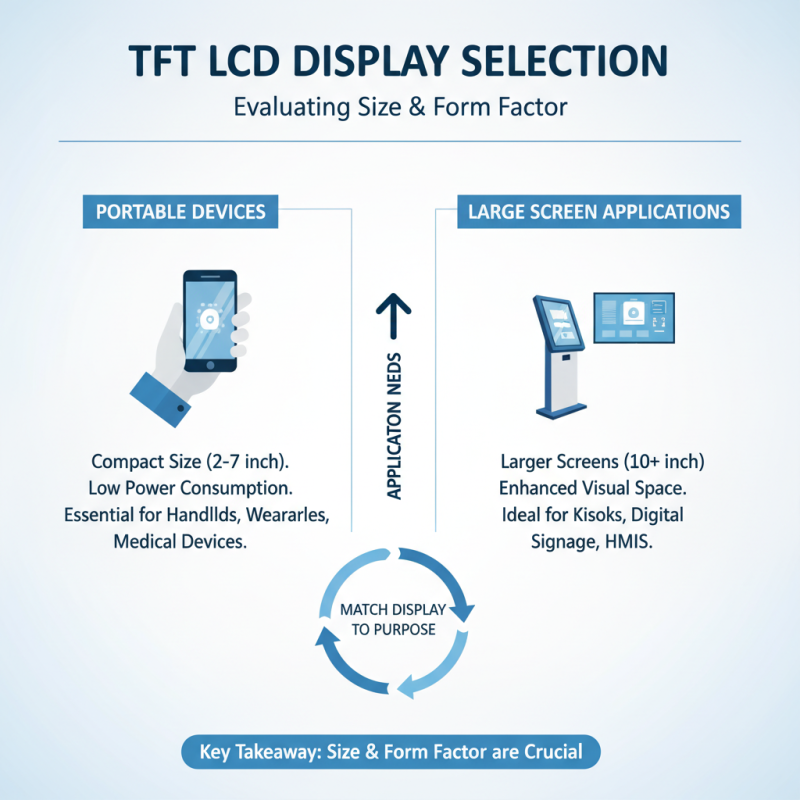
Choosing the right TFT LCD display starts with understanding your specific application needs. The size and form factor of the display play a crucial role in how effectively the screen can serve its purpose. For portable devices, a compact display is essential. Larger screens, on the other hand, are beneficial for applications needing more visual space, like kiosks or digital signage.
Tip: Measure your installation area before selecting a size. You might find that a slightly smaller screen gives you more flexibility. Form factors also matter. A landscape orientation suits presentations, while portrait setups are ideal for reading content. Consider the environment where the display will be used. High ambient light requires screens with better brightness and contrast.
Another aspect to reflect on is the resolution. High resolution is great for detailed images, but it isn’t always necessary for basic functionality. Balance your budget and needs carefully. You might realize that a lower resolution suffices for simple data displays. A smart approach includes testing different sizes and resolutions to gauge what works best for you. Always prioritize the user experience when making these decisions.
Analyzing Backlight Options: LED vs. Traditional for Energy Efficiency
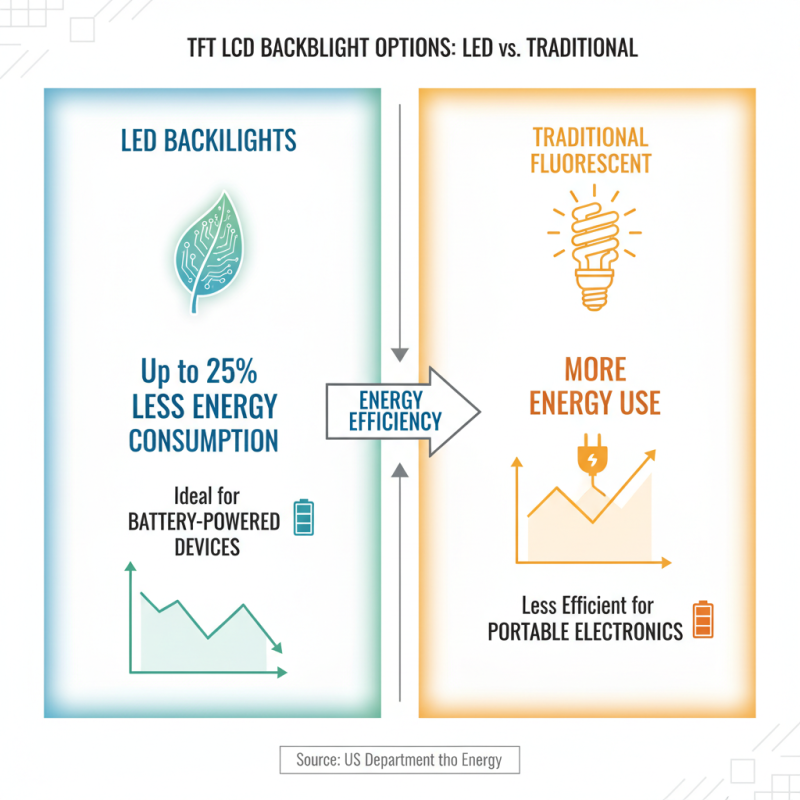
When selecting the right TFT LCD display, backlight options play a crucial role. The two main types are LED and traditional fluorescent backlighting. LED backlights consume considerably less energy. According to the U.S. Department of Energy, LED displays can use up to 25% less energy than traditional options. This energy efficiency is significant for battery-dependent devices.
LED backlights also offer better brightness and color accuracy. Studies show that LED displays maintain consistent color at various angles. This is an advantage for applications requiring precise visuals, such as graphic design. However, the cost of LED technology is often higher. This can be a barrier for budget-sensitive projects.
Traditional backlights, while cheaper, present certain drawbacks. They are less efficient, contributing to higher energy bills over time. Moreover, their lifespan is shorter, leading to increased replacement costs. Users must weigh the initial savings against long-term expenses. It’s vital to analyze the intended use and budget constraints before making a decision. Exploring these options allows for a more informed choice tailored to specific needs.
Considering Response Time and Refresh Rate: Importance in Different Uses
When choosing a TFT LCD display, response time and refresh rate play crucial roles. Response time measures how quickly a pixel can change from black to white and back again. A lower response time—ideally below 5 ms—is necessary for fast-moving content, such as gaming or sports. According to a recent study by DisplayMate, displays with faster response times reduce motion blur, enhancing the viewing experience. This is vital for gamers, where every millisecond counts.
Refresh rate indicates how many times the display refreshes the image per second. A higher refresh rate, such as 120 Hz or more, is essential for smooth motion display. Research from the International Society for Information Display found that a 60 Hz refresh rate may not suffice for high-paced video games. Many competitive gamers prefer 144 Hz or higher to keep gameplay fluid. A mismatch in refresh rate and response time can lead to tearing, affecting performance.
Choosing the right combination depends on your specific needs. Casual users might not notice differences in lower specifications, while professionals and gamers certainly will. Poor choices may lead to dissatisfaction. Therefore, understanding these metrics ensures you pick a display tailored for your experience, whether it's for work, gaming, or multimedia consumption. Making informed decisions often involves weighing these factors carefully.
How to Choose the Best TFT LCD Display for Your Needs?
| Feature |
Description |
Typical Value |
Use Case |
| Response Time |
Time taken for a pixel to change from one color to another |
5 ms to 10 ms |
Gaming, fast-moving video content |
| Refresh Rate |
Number of times the display updates per second |
60 Hz to 120 Hz |
Gaming, multimedia, general usage |
| Resolution |
Number of pixels displayed horizontally and vertically |
1920 x 1080 (Full HD) |
General use, gaming, graphic design |
| Color Depth |
Number of bits used to represent the color of a single pixel |
8 bit, 10 bit |
Graphic design, video editing |
| Viewing Angle |
Maximum angle at which the display can be viewed without distortion |
160° to 178° |
Multimedia, presentations |