How to Choose the Best Oled Touch Monitor for Your Needs?
Choosing the right Oled Touch Monitor can be challenging. With various options available, understanding your specific needs is crucial. Renowned industry expert, Dr. Sarah Thompson, highlights this: "Selecting the perfect Oled Touch Monitor requires not just technology, but also an awareness of user interaction."
Many factors come into play when deciding on an Oled Touch Monitor. Consider screen size, resolution, and touch sensitivity. A larger screen may enhance visibility, but it could take up too much desk space. Moreover, high resolution brings clarity, yet it may also increase costs. Finding a balance between these elements is essential.
It’s also important to think about the intended environment. Will the monitor be used in bright settings or dimly lit spaces? Environmental factors can impact performance. Moreover, the reputation of brands varies; some may not offer reliable support. Ultimately, a thoughtful approach can lead you to the best Oled Touch Monitor for your unique requirements.

Understanding OLED Technology and Its Advantages
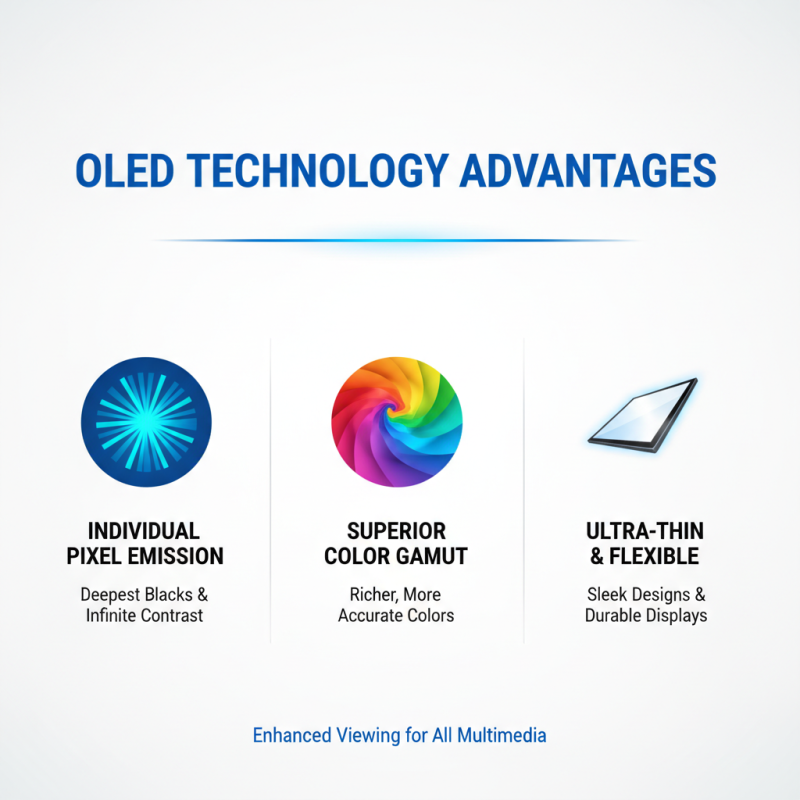
OLED technology stands out for its vibrant colors and deep blacks. Unlike traditional LCDs, OLED panels emit light individually per pixel. This allows for richer imagery and impressive contrast. Many users appreciate how OLED screens enhance viewing experiences, especially for multimedia tasks.
The advantages of OLED include faster response times and wider viewing angles. Users often notice that colors remain consistent even from extreme angles. This feature is beneficial for collaborative work, as multiple people can see the screen without distortion. However, some may find OLED displays can suffer from screen burn-in over time. It's important to weigh this risk for long-term use.
Reliability is essential when choosing a monitor. OLEDs have a shorter lifespan than some other technologies, which might concern professionals. Users should consider how often the monitor will be in use. Those who need a vibrant display might lean towards OLED, despite its few drawbacks. Reflecting on personal usage patterns is crucial for making the right choice.
Key Features to Consider in an OLED Touch Monitor
When selecting an OLED touch monitor, understanding key features is crucial. One significant aspect is the display resolution. A higher resolution provides clearer images and sharper text. Opt for at least 1080p for everyday tasks. For professional work, 4K resolution may be necessary. It can enhance the details in graphics design or video editing.
Another feature to consider is color accuracy. Monitors with better color reproduction ensure that what you see on screen matches reality. Check specifications for color gamut and calibration options. This is essential if your work involves visual arts or photography. Touch responsiveness is also critical. You want a monitor that responds quickly to your touch. Delays can disrupt your workflow. Consider models that utilize advanced touch technology for better sensitivity.
Viewing angles also matter. Some monitors maintain color accuracy and brightness better from different angles. This can be vital in collaborative settings. Lastly, think about connectivity options. Ensure the monitor has ports that fit your devices. A variety of connection types offers flexibility for different setups. While you may prioritize certain features, reflect on your actual usage. Balancing these aspects will lead to a more satisfying choice.
Comparison of Key Features in OLED Touch Monitors
Assessing Size and Resolution for Your Specific Use Case
When selecting an OLED touch monitor, size and resolution are critical factors that vary based on your specific use case. A report by MarketsandMarkets states that the demand for larger displays is rising, with screens ranging from 27 inches to 32 inches gaining popularity. For artists and designers, a larger monitor allows for detailed work. However, for gaming or general office tasks, a 24-inch display might suffice.
Resolution plays a significant role in visual clarity. A high resolution, such as 4K, provides sharper images and finer details. According to DisplayMate, OLED monitors with 4K resolution exhibit superior color accuracy and contrast, which is essential for graphic-intensive tasks. Nevertheless, higher resolutions often require more powerful hardware, leading to potential compatibility issues. Balancing the need for superior quality with hardware limitations is crucial.
Users should also consider their viewing distance. For monitors larger than 32 inches, sitting too close can cause pixelation. Conversely, smaller 1080p monitors might not deliver that immersive detail needed for gaming or video editing. Finding the right size and resolution often involves compromises that reflect individual priorities and professional requirements. Making an informed decision is vital, especially in a market where technology evolves rapidly.
How to Choose the Best Oled Touch Monitor for Your Needs?
| Screen Size (Inches) |
Resolution |
Aspect Ratio |
Best Use Case |
Price Range ($) |
| 24 |
1920 x 1080 |
16:9 |
Graphic Design |
300 - 500 |
| 27 |
2560 x 1440 |
16:9 |
Gaming |
400 - 700 |
| 32 |
3840 x 2160 |
16:9 |
Video Editing |
800 - 1200 |
| 15.6 |
1920 x 1080 |
16:9 |
Portable Use |
200 - 400 |
| 34 |
3440 x 1440 |
21:9 |
Multimedia |
900 - 1500 |
Evaluating Touch Sensitivity and Response Time
When selecting an OLED touch monitor, touch sensitivity and response time are crucial factors to consider. Touch sensitivity refers to how well the screen detects input. A highly sensitive monitor ensures accurate interaction, making tasks smoother. Users will benefit from a monitor that registers light touches, especially for design work or detailed tasks. A balance in sensitivity is vital; too much can lead to unintended actions.
Response time is the delay between input and action. A fast response time enhances the overall experience. Delays can frustrate users, especially during fast-paced tasks. Monitors with a response time below 10 ms are generally considered great for interactive work. However, many high-quality screens achieve impressive response times. Some models may still experience lag, particularly under heavy use. It's essential to test different options to find the right fit for your needs.
Consider the environment as well. Ambient light and touch frequency can influence performance. Monitors used in bright settings might not perform as well due to glare and reflections. Users should also factor in how often they will touch the screen. A monitor used for occasional tasks may not require the same level of sensitivity or response time as one for continuous interaction.
Comparing Brands and Models for Best Value and Support
When selecting an OLED touch monitor, comparing brands and models is essential. Different manufacturers offer various features. Some may prioritize display quality, while others focus on touch responsiveness. Understanding your specific needs can greatly influence your choice.
Customer reviews often highlight support quality. Some brands may lag in response times. This can lead to frustration, especially if issues arise. Consider looking into warranty options, as they can indicate reliability. It's important to seek monitors that offer comprehensive support, helping you avoid post-purchase dilemmas.
Performance varies widely between models. Some users report
exceptional color accuracy, while others find touch sensitivity lacking. An ideal choice balances both. Before making a final decision, testing monitors in-store can provide invaluable insights. Don't overlook the importance of ergonomics; how comfortable a monitor feels can affect your productivity.