How to Choose the Best Circular Lcd Screens for Your Needs?
When considering how to choose the best Circular LCD Screens, one must emphasize clarity and functionality. The global market for LCD screens is expected to grow significantly, with a projected compound annual growth rate of 5.4% from 2023 to 2030. This growth is driven by demand in sectors like advanced manufacturing and consumer electronics. However, selecting the right screen involves more than just numbers.
Quality, certification, and compatibility are critical factors. Look for screens that have ISO and CE certifications for reliability. Additionally, pay attention to the display size and resolution, as they can greatly affect user experience. It's also essential to consider the environment where the screen will be used; outdoor screens require different features than those for indoor use.
Not all Circular LCD Screens are created equal. Some may not meet specific user needs, leading to regrets later. Exploring options at trade shows, like the upcoming 139th Canton Fair, can offer insights into the latest technologies and trends. Ultimately, making an informed choice can enhance productivity and user satisfaction.
Understanding Circular LCD Screen Types and Technology
When exploring circular LCD screens, it's essential to understand the different types available. These screens come in various technologies, such as IPS, TN, and VA. Each technology offers distinct advantages and drawbacks.
IPS screens provide better color accuracy and wider viewing angles. On the other hand, TN screens may be faster for gaming but lack in color quality.
VA displays can deliver deep blacks, but sometimes struggle with ghosting effects.
Choosing the right technology is crucial for your needs. Think about what you will use the screen for.
For design work, color precision matters a lot. If you're gaming, response time should be prioritized. Notice the size and resolution as well. A larger screen offers an immersive experience, yet higher resolution enhances detail sharply.
Don't overlook factors like brightness and contrast ratio either; these influence overall visual quality.
However, not every circular LCD screen is flawless. Some may suffer from inconsistent colors across the display. Users might find viewing angles limited even in IPS versions. Reflections and glare can also be distracting in certain settings.
It’s important to weigh these shortcomings against your specific needs. Taking the time to research and analyze can lead to a more satisfying choice.
Key Features to Consider When Selecting Circular LCD Screens
Choosing the best circular LCD screens requires understanding key features that matter for your specific application. One critical feature is resolution. A screen with a higher resolution offers sharper images. Research shows that screens with over 800x600 pixels are ideal for detailed graphics. This specification can greatly enhance user experience, especially in professional settings.
Another important aspect is brightness, measured in nits. A brightness level above 400 nits suits applications in well-lit environments. In contrast, lower brightness may only be effective indoors. This specification might become problematic if the screen isn’t bright enough for your needs.
Consider the viewing angle as well. Circular LCD screens typically perform well when viewed from various angles. A wide viewing angle of 160 degrees or more can make a big difference in visibility. However, you may discover that some models distort colors when viewed off-angle. This inconsistency can affect presentations or public displays, and it’s worth testing screens in different conditions before purchasing.
Evaluating Size and Resolution for Your Display Needs
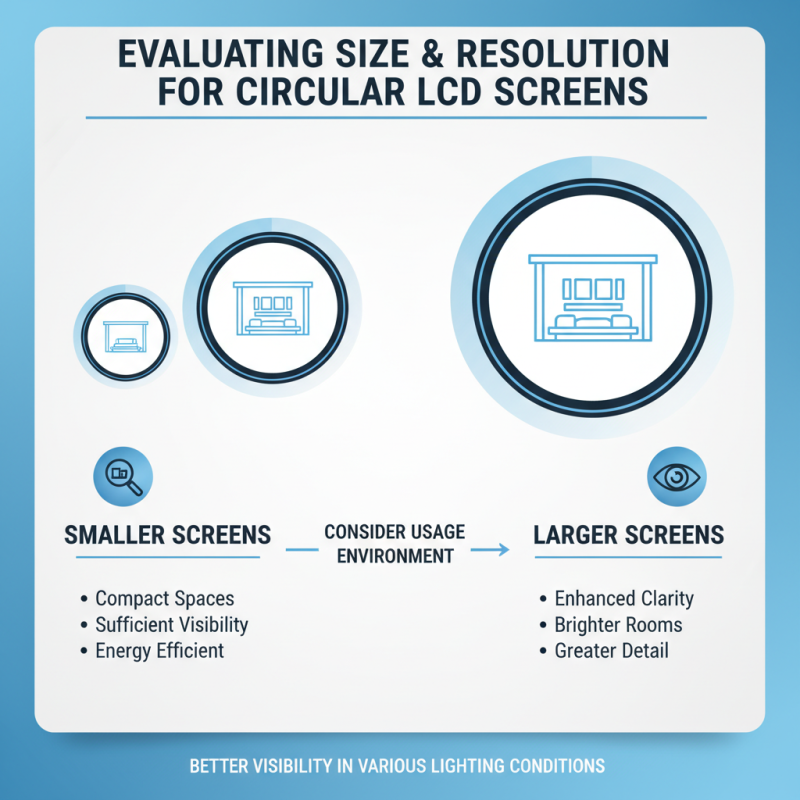
When choosing circular LCD screens, size and resolution play a vital role. A larger screen often provides better visibility in various lighting conditions. It’s essential to consider where the screen will be used. For small spaces, a smaller size may suffice. Yet, larger displays can enhance clarity in bigger rooms.
Resolution is equally important. A higher resolution gives sharper images. This becomes critical for detailed applications. Choose a resolution that meets your specific needs. Consider how the screen will be viewed. If it’s used for presentations, clarity is crucial. For casual use, a lower resolution may be acceptable.
Tips: Select a size that offers a comfortable viewing distance. Think about the environment where the screen will be placed. Reflect on whether you need high resolution for text or graphics. Always test the screen in your actual set-up if possible. Don't rush into a decision; take time to analyze your options.
Analyzing Compatibility with Existing Equipment and Systems
Choosing the right circular LCD screen involves more than just size and resolution. Compatibility with existing equipment and systems is crucial. Analyzing connections like HDMI, VGA, and USB is essential. A study by Tech Insights found that 75% of system failures stem from compatibility issues. Each connection type has specific requirements, and overlooking these can lead to malfunction.
For optimal integration, check the specifications of your current devices. Ensure that your new screen can seamlessly work with your existing setup. Consider the pixel density as well. Higher pixel density can improve visibility but may not be necessary for all applications.
Tip: Before purchasing, test the screen with your current hardware if possible. This step can prevent future headaches.
Configuring circular LCD screens may require additional adapters or connectors. Several manufacturers report up to a 20% increase in adaptability when using versatile connectors. Not all screens will work with every system, especially older ones. Look for screens that offer flexible integration options.
Tip: Stay updated with industry standards. These can change, impacting your choices.
Budgeting: Cost Factors and Value for Circular LCD Screens
When selecting circular LCD screens, budgeting plays a critical role. Many factors contribute to the cost. Size, resolution, and brightness level significantly impact pricing. A larger screen often costs more. Higher resolution displays enhance image clarity but come at a price. Brightness levels affect usability in different environments.
It's essential to evaluate your specific needs. If you require outdoor visibility, a brighter display may be necessary. Such screens tend to be more expensive. For indoor use, budget models might suffice. However, underestimating brightness can lead to frustrating experiences. Those cost savings may not be worth reduced functionality.
Consider long-term value as well. Cheaper screens may have lower lifespans. They could require replacements sooner than expected. Investing in a higher-quality display could save money over time. Yet, this often requires an upfront investment. Balance immediate costs with future needs. Think critically about what you truly need from a screen.